

Motion Blur Photography Settings
Capturing movement in a still image can create a sense of energy, drama, and artistry. Motion blur photography settings are essential for photographers who want to emphasize speed, flow, or the passage of time in their images. Whether you’re photographing city traffic at night, flowing water, or athletes in action, understanding how to control blur is key to producing stunning results.
This guide covers the core camera settings, tips, and creative techniques for achieving beautiful motion blur. If you’re interested in exploring related creative techniques, check out how to shoot moving lights for more inspiration on capturing dynamic scenes.
Understanding the Basics of Motion Blur
Motion blur occurs when a moving subject (or the camera itself) is captured with a slow enough shutter speed that its movement registers as a streak or blur in the image. This effect can be used intentionally to convey motion or accidentally if the camera settings aren’t suited for the scene. Mastering the right motion blur photography settings allows you to take control of this effect for creative results.
There are two main types of motion blur:
- Subject motion blur: The subject moves during the exposure, creating a streaked or ghosted appearance.
- Camera shake blur: The camera moves during the exposure, causing the entire image to blur.
For most creative purposes, you’ll want to keep the camera steady and let the subject create the blur, unless you’re intentionally panning or moving the camera for a specific effect.
Essential Camera Settings for Capturing Motion
To achieve the desired blur, you need to adjust several key camera settings. Here’s what to focus on:
Shutter Speed: The Primary Factor
The most critical setting for motion blur is shutter speed. A slower shutter speed allows more movement to be recorded in a single frame. Typical starting points include:
- 1/30 sec or slower for walking people or gentle movement
- 1/10 sec or slower for fast-moving vehicles or flowing water
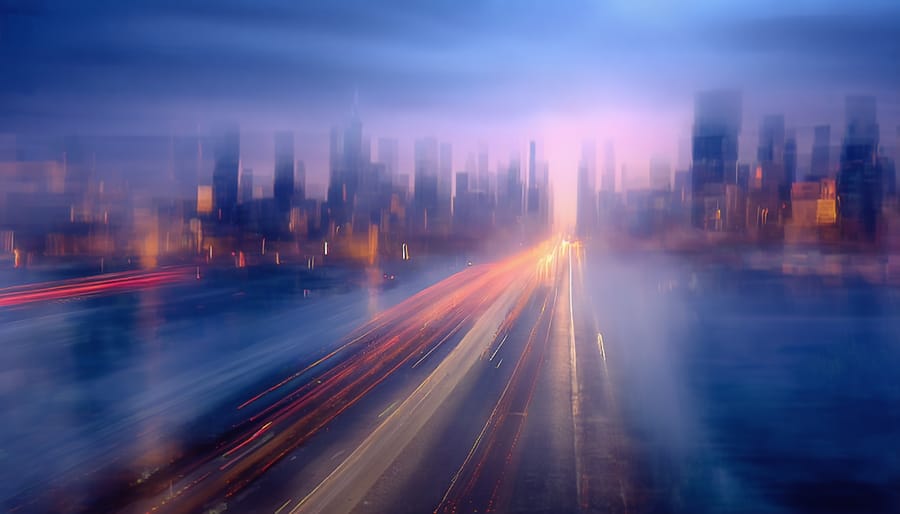
- Several seconds for dramatic light trails or night cityscapes
Experiment with different speeds to find the right balance between sharpness and blur for your subject. Remember, the slower the shutter, the more pronounced the blur will be.
Aperture and ISO: Supporting Roles
When using slow shutter speeds, you’ll often need to adjust the aperture and ISO to maintain proper exposure:
- Aperture: A smaller aperture (higher f-number, like f/8 or f/16) lets in less light, helping prevent overexposure during long exposures. It also increases depth of field, keeping more of the scene in focus.
- ISO: Keep ISO as low as possible (ISO 100 or 200) to minimize noise during longer exposures. Higher ISO can help in low light, but may introduce graininess.
Balancing these three settings—shutter speed, aperture, and ISO—is the foundation of effective motion blur photography settings.
Stabilization: Tripods and Other Tools
To avoid unwanted camera shake, use a sturdy tripod when working with slow shutter speeds. If you don’t have a tripod, stabilize your camera on a solid surface. Many cameras and lenses offer image stabilization, but for exposures longer than 1/10 sec, a tripod is still recommended. A remote shutter release or self-timer can further reduce vibrations.
For more on how light interacts with movement, see light and movement in city photography for additional creative ideas.
Creative Techniques for Dynamic Images
Once you’ve mastered the basic settings, try these creative approaches to add impact to your motion blur shots:
- Panning: Move the camera along with a moving subject using a slower shutter speed. The subject appears sharp while the background blurs, emphasizing speed.
- Intentional Camera Movement (ICM): Move the camera during exposure to create abstract patterns and streaks.
- Light trails: Use long exposures at night to capture the trails of car headlights, city lights, or fireworks.
- Water blur: Slow shutter speeds can turn waterfalls, rivers, or ocean waves into silky, flowing textures.
Experiment with different combinations of settings and movement to discover your own style.

Lighting Considerations for Motion Blur
Lighting plays a significant role in how motion blur appears. In bright conditions, you may need to use a neutral density (ND) filter to reduce the amount of light entering the lens, allowing for slower shutter speeds without overexposing the image. In low light or at night, longer exposures are easier to achieve, but you’ll need to manage noise and color balance.
For a deeper dive into the science and artistry of lighting, visit this comprehensive guide to photography lighting for expert insights.
Common Challenges and How to Solve Them
While experimenting with motion blur photography settings, you may encounter a few common issues:
- Overexposure: If your images are too bright, use a smaller aperture, lower ISO, or add an ND filter.
- Unwanted camera shake: Always use a tripod and remote shutter release for longer exposures.
- Subject too sharp or too blurry: Adjust shutter speed incrementally to fine-tune the amount of blur.
- Focus issues: Pre-focus on a spot where the subject will pass, or use manual focus for consistency.
With practice and patience, you’ll learn to anticipate and resolve these challenges for more consistent results.
Advanced Tips for Stunning Motion Blur Photos
- Use burst mode to capture several frames in quick succession, increasing your chances of getting the perfect shot.
- Experiment with white balance to achieve different moods, especially in artificial or mixed lighting.
- Combine blur with sharp elements by using rear curtain sync flash, which freezes part of the action at the end of the exposure.
- Explore more creative ideas in creative light shadows photography for inspiration on blending light, shadow, and movement.
Don’t hesitate to try unconventional approaches—sometimes the most memorable images come from experimentation.
FAQ
What is the best shutter speed for motion blur?
The ideal shutter speed depends on your subject and the amount of blur you want. For subtle movement, try 1/30 sec; for dramatic blur, use 1/10 sec or slower. Fast-moving subjects may require even longer exposures.
How do I avoid unwanted camera shake when using slow shutter speeds?
Use a tripod and a remote shutter release or self-timer to minimize vibrations. Image stabilization can help, but a stable setup is best for exposures longer than 1/10 sec.
Can I create motion blur in bright daylight?
Yes, but you’ll likely need a neutral density (ND) filter to reduce light and allow for slower shutter speeds without overexposing your image. Adjust aperture and ISO as needed to maintain proper exposure.
Should I use manual or autofocus for motion blur shots?
Manual focus is often more reliable, especially in low light or when pre-focusing on a specific spot. Autofocus can struggle with moving subjects in dim conditions.
What camera mode is best for motion blur?
Shutter Priority (S or Tv) mode lets you set the shutter speed while the camera adjusts aperture. Manual mode gives you full control over all settings, which is ideal for more advanced techniques.