

Capturing Speed in Photography
Capturing speed in photography is a fascinating way to convey energy, motion, and excitement in still images. Whether you’re photographing racing cars, athletes in action, or city lights at night, mastering the techniques for freezing or blurring movement can elevate your visual storytelling. This guide explores the essential camera settings, creative approaches, and lighting considerations that help you translate motion into compelling photographs.
Understanding how to depict movement is not just about technical know-how—it’s also about creative vision. By learning to control exposure, shutter speed, and lighting, you can create images that either freeze a split-second or artistically blur motion for dramatic effect. For those interested in exploring related lighting techniques, the article on creative light shadows photography provides further inspiration for manipulating light and shadow in your shots.
Understanding Motion and Camera Settings
The foundation of portraying motion lies in your camera’s exposure settings. The most critical factor is shutter speed, which determines how long the camera’s sensor is exposed to light. A fast shutter speed (such as 1/1000s) can freeze fast-moving subjects, while a slower shutter speed (like 1/30s or below) allows moving elements to blur, creating a sense of speed.
Other settings, such as aperture and ISO, also play a role. A wide aperture (low f-number) lets in more light, which is helpful when using faster shutter speeds. Meanwhile, adjusting ISO helps compensate for low-light conditions, though higher ISO can introduce noise. For a deeper dive into how exposure time affects your images, see the detailed explanation in understanding exposure time.
Techniques for Freezing and Blurring Motion
There are two primary ways to depict movement: freezing action or creating intentional blur. Each approach requires different camera settings and techniques.
Freezing Fast Action
To stop motion, select a high shutter speed. This is ideal for sports, wildlife, or any fast-moving subject. Use continuous autofocus (AI Servo or AF-C) to keep your subject sharp as it moves. Burst mode is also helpful, allowing you to capture multiple frames in quick succession and choose the best moment.
Creating Motion Blur
To emphasize speed, use a slower shutter speed. This technique works well for subjects like cars, cyclists, or runners. Panning—moving the camera along with the subject—keeps the subject relatively sharp while blurring the background, enhancing the feeling of motion. Experiment with different shutter speeds to achieve the desired effect; even slight adjustments can dramatically change the outcome.
Lighting’s Role in Conveying Motion
Lighting is a crucial element when working with motion. Bright, even light allows for faster shutter speeds, while low-light conditions often require slower shutter speeds and can introduce blur. Artificial lighting, such as strobes or continuous lights, can help freeze action indoors or at night. For more insights into the impact of lighting, check out this comprehensive guide on the importance of light in photography.
Experimenting with light sources, direction, and intensity can add drama or clarity to your motion shots. Backlighting, for example, can create striking silhouettes of moving subjects, while side lighting can enhance the sense of depth and speed.
Creative Approaches to Depicting Speed
Beyond technical settings, creative choices play a big role in how speed is perceived in your images. Consider the following ideas to add visual interest:
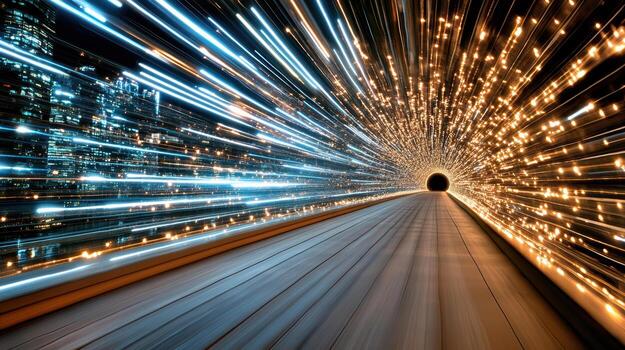
- Light trails: Use long exposures at night to capture the streaks of car headlights or city lights, emphasizing the flow of movement.
- Zoom blur: While exposing, zoom your lens in or out to create a radial blur effect, drawing the viewer’s eye toward the center.
- Multiple exposures: Combine several frames of a moving subject into one image to illustrate the progression of motion.
- Reflections and shadows: Incorporate reflective surfaces or dramatic shadows to enhance the sense of speed and add layers to your composition. For more on this, explore the article on chiaroscuro in photography.

Choosing the Right Gear for Motion Shots
While any camera can be used to capture movement, certain equipment makes the process easier and more effective. Fast lenses (with wide maximum apertures) are helpful for letting in more light, enabling faster shutter speeds. Cameras with advanced autofocus systems and high burst rates are advantageous for tracking and freezing action.
Tripods and monopods can stabilize your camera during long exposures, reducing unwanted blur. Neutral density (ND) filters are useful in bright conditions, allowing you to use slower shutter speeds without overexposing the image. For lighting, portable flashes or LED panels offer flexibility when shooting in low-light environments or when you need to freeze motion indoors.
Common Challenges and Solutions
Photographing speed presents unique challenges, but with a few strategies, you can overcome them:
- Low light: Increase ISO, open the aperture, or add artificial lighting to maintain fast shutter speeds.
- Unwanted blur: Use a tripod or image stabilization, and ensure your shutter speed matches the speed of your subject.
- Focusing issues: Switch to continuous autofocus and use focus tracking to keep moving subjects sharp.
- Overexposure in bright light: Employ ND filters or increase shutter speed to control light intake.
Experimentation is key. Review your images, adjust settings, and try different techniques to achieve the desired effect. For more lighting techniques, see the article on broad lighting vs short lighting for insights into how lighting direction can impact your photos.
Frequently Asked Questions
What shutter speed should I use to freeze fast-moving subjects?
To freeze rapid motion, use a shutter speed of at least 1/500s or faster. For extremely fast subjects like sports or wildlife, 1/1000s or higher is often necessary. Adjust based on the speed of your subject and the amount of available light.
How can I create light trails in my photos?
Light trails are created by using a slow shutter speed, typically several seconds, in low-light conditions. Mount your camera on a tripod, set your shutter speed to a few seconds, and capture moving lights such as cars or bicycles. Experiment with exposure times to achieve the desired effect.
Why are my motion photos blurry, and how can I fix it?
Blurry images can result from camera shake, slow shutter speeds, or incorrect focus. Use a tripod or image stabilization, increase your shutter speed, and ensure you’re using the correct autofocus mode for moving subjects. Reviewing your images and adjusting settings will help you achieve sharper results.