

Color Temperature Explained
Understanding color temperature is essential for anyone working with photography, videography, or lighting design. Whether you are a beginner or an experienced creator, knowing how different light sources affect the look and feel of your images can help you achieve the results you want. This guide will break down the science behind color temperature, its practical applications, and how you can use it to enhance your creative projects.
Color temperature is a concept that describes the appearance of light, ranging from warm, yellowish tones to cool, bluish hues. It is measured in Kelvin (K) and plays a crucial role in how we perceive and capture scenes. By learning how to control and adjust color temperature, you can create more accurate, visually appealing images and videos.
For those interested in exploring more about lighting setups, check out our article on how to use continuous light for practical tips and techniques.
What Is Color Temperature?
Color temperature refers to the characteristic color of light emitted by a source, expressed in degrees Kelvin (K). Lower values, such as 2,700K, produce a warm, orange-yellow glow similar to incandescent bulbs or candlelight. Higher values, like 6,500K, emit a cool, blue-white light, much like daylight on a clear afternoon.
The concept comes from physics, where a theoretical "black body" radiator changes color as it is heated. At lower temperatures, it glows red or orange; as the temperature increases, it shifts to white and eventually blue. This scientific principle is the foundation for how we measure and describe the color of artificial and natural light sources.
Why Color Temperature Matters in Photography and Video
Getting the right color temperature is vital for accurate color reproduction in photos and videos. If your lighting is too warm or too cool, skin tones can look unnatural, and the overall mood of your image may not match your creative intent. Cameras and editing software allow you to adjust white balance, which compensates for different lighting conditions and ensures that whites appear truly white.
For example, shooting indoors under tungsten lights (around 3,200K) without adjusting your camera's white balance can result in orange-tinted images. Conversely, shooting outdoors in the shade (around 7,000K) may give your photos a blue cast. Understanding how to adjust for these differences helps you maintain color consistency across your work.
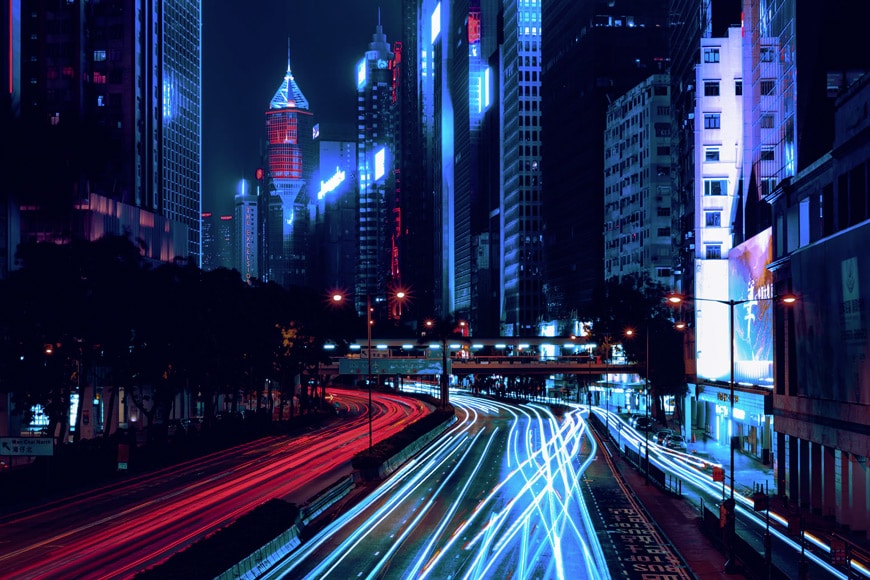
Common Color Temperatures and Their Uses
Different light sources have unique color temperatures. Here are some typical examples:
- Candlelight: ~1,800K (very warm, orange-red)
- Incandescent bulbs: 2,700K–3,200K (warm, yellowish)
- Fluorescent lights: 4,000K–5,000K (neutral to cool white)
- Daylight (noon): 5,500K–6,500K (neutral to slightly blue)
- Shade or overcast sky: 7,000K–8,000K (cool, blue)
Choosing the right lighting for your scene depends on the mood you want to create. Warm light is often used for cozy, inviting atmospheres, while cool light can feel modern or clinical. In portrait photography, balancing color temperature is essential for natural-looking skin tones.
How to Adjust Color Temperature in Camera and Post-Processing
Most modern cameras offer several ways to control color temperature:
- Auto White Balance (AWB): The camera detects the lighting and adjusts automatically. This is convenient but not always accurate, especially in mixed lighting.
- Preset Modes: Options like "Daylight," "Tungsten," or "Shade" set the white balance to typical values for those conditions.
- Kelvin Mode: Manually select a specific color temperature for precise control.
- Custom White Balance: Use a gray card or white object to set a reference point for the camera.
In post-processing, software like Adobe Lightroom or Photoshop allows you to fine-tune white balance and correct any color casts. Shooting in RAW format gives you the most flexibility, as you can adjust color temperature without degrading image quality.
Tips for Managing Color Temperature on Set
Here are some practical tips for working with different lighting conditions:
- Use gels or filters on your lights to match color temperatures when mixing sources.
- Set your camera’s white balance manually for consistent results, especially in controlled environments.
- When shooting outdoors, be aware of changing light throughout the day and adjust your settings as needed.
- Consider using a color checker or gray card to ensure accurate color reproduction.
If you want to learn more about shaping and controlling light, our article on using reflectors for portraits provides additional insights into modifying light quality and direction.
Color Temperature and Creative Expression
Beyond technical accuracy, color temperature can be a powerful creative tool. Warm lighting can evoke feelings of nostalgia or comfort, while cool lighting may suggest distance or modernity. Filmmakers and photographers often use these qualities to reinforce the mood of a scene.
Experimenting with different settings and light sources allows you to develop your own style. For example, intentionally using a warmer or cooler white balance than the actual lighting can create a unique visual effect. Just remember to keep your choices consistent within a project to maintain a cohesive look.
Further Learning and Resources
For those just starting out, understanding the basics of lighting is crucial. A helpful resource is this beginner's guide to photography lighting, which covers foundational concepts and practical advice.
Additionally, exploring topics like rim lighting techniques and direction of light in photography can help you refine your approach to lighting and color in your creative work.
Frequently Asked Questions
What does Kelvin mean in color temperature?
Kelvin (K) is the unit used to measure color temperature. It describes the hue of a specific light source, ranging from warm (lower K values) to cool (higher K values). The higher the Kelvin number, the bluer or cooler the light appears.
How do I choose the right color temperature for my project?
Consider the mood and style you want to achieve. For a cozy, inviting look, use warmer lighting (2,700K–3,200K). For a clean, modern feel, opt for cooler lighting (5,500K–6,500K). Always adjust your camera’s white balance to match your chosen light source for accurate colors.
Can I mix different color temperatures in one scene?
Mixing light sources with different color temperatures can create unwanted color casts and make color correction challenging. If you must mix, use gels or filters to match the lights as closely as possible, or embrace the creative effect for stylistic purposes.
Does color temperature affect black and white photography?
While black and white images do not display color, the color temperature of your lighting still affects contrast and tonal range. Warmer or cooler light can influence the mood and depth of your monochrome photos.
Is it better to fix color temperature in camera or in post-processing?
Setting the correct white balance in camera ensures more accurate results and saves editing time. However, shooting in RAW allows for flexible adjustments in post-processing without loss of quality. Ideally, strive for accuracy in camera and use editing software for fine-tuning.
This article contains affiliate links. We may earn a commission at no extra cost to you.